Why Enterprises Need Technology Partners – Not Just Vendors – in 2026
Cloud migration sounds straightforward.
Move workloads from the data center to the cloud. Switch everything on. Shut down the old infrastructure.
If only it were that simple.
For modern enterprises, migration is rarely just an infrastructure project. Applications depend on databases. Databases depend on networks. Networks depend on security policies. Employees depend on applications, and customers depend on all of it working without interruption.
One overlooked dependency can turn a well-planned migration into an expensive troubleshooting exercise.
That is why successful Oracle Cloud migration starts long before the first workload moves.
Oracle’s own Cloud Adoption Framework recommends a phased approach covering strategy, planning, implementation, operations, and ongoing optimization.
This practical Oracle Cloud migration checklist walks through the process – from initial assessment to post-migration optimization – so enterprises can approach the move systematically.
1. What Is Oracle Cloud Migration?
Oracle Cloud migration is the process of moving applications, databases, infrastructure, workloads, and associated data from an existing environment into Oracle Cloud Infrastructure (OCI) or another Oracle Cloud environment.
The source could be:
- An on-premises data center
- A legacy hosting provider
- Another public cloud
- A private cloud
- A hybrid environment
But migration does not necessarily mean moving everything exactly as it exists today.
Sometimes the right answer is to move an application as-is.
Sometimes it makes more sense to modernize it first.
That distinction matters.
2. Why Enterprises Are Moving to Oracle Cloud
For many organizations, the cloud conversation has moved beyond simply reducing data-center dependency.
Enterprises are looking for:
- Greater scalability
- Better infrastructure agility
- Stronger security
- Improved resilience
- Faster application deployment
- Modern database capabilities
- Better operational visibility
- More predictable infrastructure management
OCI is designed for a broad range of enterprise workloads, including mission-critical applications and database environments.
But cloud adoption only creates business value when the architecture is designed around actual business requirements.
Moving inefficient architecture to the cloud does not magically make it efficient.
3. Start With Business Goals, Not Infrastructure
This is perhaps the most important step in the entire checklist.
Before asking:
“What should we migrate?”
ask:
“Why are we migrating?”
Your answer could be:
- Reduce infrastructure overhead
- Modernize legacy applications
- Improve disaster recovery
- Increase application performance
- Support geographic expansion
- Consolidate data centers
- Improve scalability
- Enable faster innovation
Document these objectives.
They become the criteria against which the migration should eventually be measured.
A migration without measurable objectives can become a technology exercise with no clear definition of success.
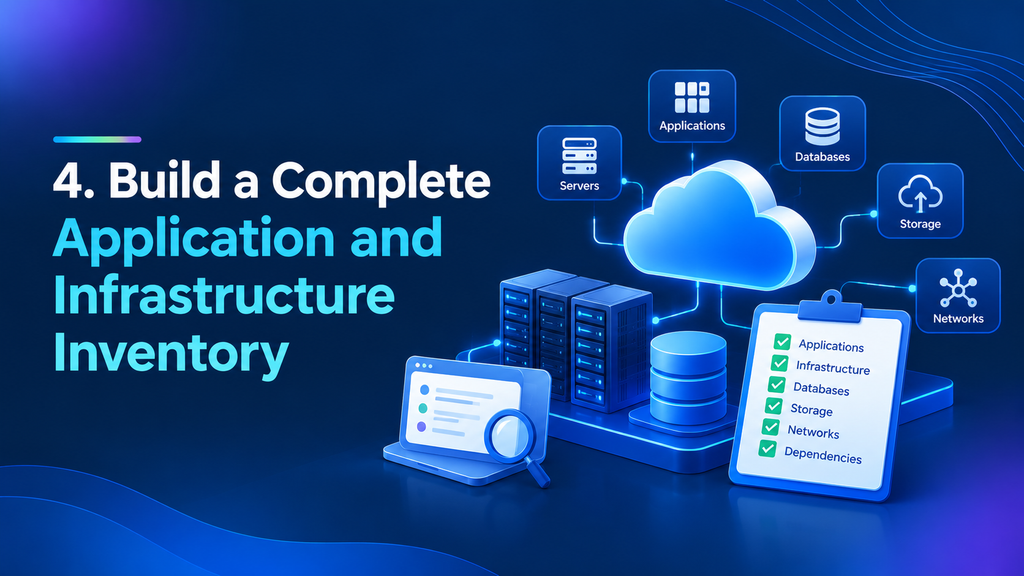
4. Build a Complete Application and Infrastructure Inventory
You cannot migrate what you don’t understand.
Create an inventory covering:
- Servers
- Virtual machines
- Databases
- Storage
- Applications
- Operating systems
- Middleware
- Network components
- APIs
- Scheduled jobs
- Security controls
- Third-party applications
Don’t stop at server names and CPU utilization.
Capture ownership, business criticality, licensing, dependencies, data sensitivity, performance requirements, and current operating costs.
Oracle’s migration guidance similarly emphasizes discovery and assessment of infrastructure, applications, architectures, licensing, requirements, and future-state design. (Oracle)
5. Map Dependencies Before Moving Anything
This is where many migration projects become complicated.
An application may appear independent until you discover that it relies on:
- A specific database
- An internal API
- An authentication service
- A file server
- A batch process
- A third-party integration
Create a dependency map.
For every critical application, identify:
What does it depend on?
And:
What depends on it?
This simple exercise can reveal hidden migration risks before they become production incidents.
6. Assess Your Current Environment
Once the inventory is complete, assess each workload.
Look at:
Performance
What are the application’s CPU, memory, storage, and network requirements?
Availability
How much downtime can the business tolerate?
Security
What information does the workload process?
Compliance
Are there regulatory or data-residency requirements?
Cost
What does the workload cost today?
Technical Debt
Is the application worth moving as-is?
Sometimes assessment produces an uncomfortable but valuable answer:
Don’t migrate this application. Replace it.
That’s still a successful migration decision.
7. Classify Workloads by Migration Strategy
Not every workload should follow the same path.
A useful framework is:
Rehost
Move the workload with minimal changes.
Often called “lift and shift.”
Replatform
Move it while making targeted improvements.
Refactor
Redesign the application to take advantage of cloud-native capabilities.
Replace
Retire the existing system and adopt a different solution.
Retain
Keep the workload where it is when migration doesn’t make business or technical sense.
Retire
Remove applications that no longer provide meaningful value.
The objective isn’t to migrate everything.
It’s to create the right future-state environment.
8. Establish Your Oracle Cloud Landing Zone
Before moving production workloads, establish a proper cloud foundation.
OCI Landing Zones provide hardened, repeatable foundations covering areas such as identity, networking, security, monitoring, and governance. Oracle provides Terraform-based landing-zone templates designed to accelerate this process.
A landing zone should establish:
- Compartments
- IAM policies
- Network architecture
- Security controls
- Logging
- Monitoring
- Governance
- Resource organization
Don’t treat the landing zone as an afterthought.
It’s the foundation of everything that follows.
9. Design the Network Architecture
Your cloud network should be designed before applications arrive.
Consider:
- Virtual Cloud Networks (VCNs)
- Subnets
- Routing
- Firewalls
- Load balancers
- DNS
- VPN
- FastConnect
- Internet connectivity
- Hybrid connectivity
Pay particular attention to IP addressing.
Oracle specifically recommends avoiding CIDR overlap between OCI networks, on-premises networks, and other connected environments.
A rushed network design can create problems that are painful to resolve later.
10. Plan Identity and Access Management
Moving to the cloud shouldn’t mean giving everyone broad access.
Apply least privilege from the beginning.
Define:
- Who can create resources?
- Who can modify them?
- Who can access production data?
- Who can manage networks?
- Who can view logs?
- Who can approve changes?
Separate responsibilities wherever practical.
Oracle’s security guidance recommends least privilege and separation of duties as foundational security principles for OCI.
11. Build Security Into the Migration From Day One
Security should not be a final-stage checkbox.
Your migration architecture should address:
- Encryption
- IAM
- Network security
- Secrets management
- Vulnerability management
- Logging
- Monitoring
- Threat detection
- Security policies
- Compliance
OCI’s security architecture is organized around several core pillars, including customer isolation, encryption, security controls, visibility, high availability, and secure infrastructure.
The key principle is simple:
Don’t migrate first and secure later.
12. Plan Data Migration Carefully
Data is often the most sensitive component of a cloud migration.
Before moving it, understand:
- Volume
- Growth rate
- Data classification
- Retention requirements
- Backup strategy
- Encryption
- Recovery objectives
- Downtime tolerance
Determine whether data should be migrated through replication, backup and restore, specialized migration services, or another approach.
The migration method should match the workload – not the other way around.
13. Review Database Migration Requirements
Oracle database workloads deserve particular attention.
Assess:
- Database version
- Size
- Performance
- Dependencies
- Licensing
- Availability requirements
- Backup and recovery
- Compatibility
- Migration tooling
Oracle’s Database Migration assessment process evaluates the source and target environments and can provide migration-method recommendations while identifying issues through preliminary testing.
For database-heavy enterprises, this assessment can become one of the most important stages of the entire program.
14. Evaluate Application Compatibility
Before migration, test the application -m not just the server.
Check:
- Operating-system dependencies
- File paths
- Network assumptions
- Hard-coded IP addresses
- Authentication
- Certificates
- Third-party libraries
- Scheduled tasks
- Performance characteristics
Legacy applications often contain hidden assumptions about their original environment.
Cloud migration exposes those assumptions quickly.
15. Plan Integrations and APIs
Modern enterprise applications rarely operate alone.
They exchange information with:
- ERP systems
- CRM platforms
- Payment systems
- Data warehouses
- Identity providers
- Marketing platforms
- External APIs
Document every integration.
Then test both directions:
Can the migrated application send data correctly?
Can it still receive data correctly?
An application that works perfectly in isolation but cannot communicate with the rest of the enterprise is not production-ready.
16. Estimate Oracle Cloud Costs
Cloud economics require discipline.
Don’t simply compare your current server bill with an estimated OCI infrastructure bill.
Consider:
- Compute
- Storage
- Network traffic
- Database services
- Backup
- Security services
- Monitoring
- Licensing
- Support
- Reserved or committed usage
- Operational staffing
Create a baseline before migration.
Then measure actual consumption afterward.
This creates a feedback loop for continuous optimization.
17. Design for High Availability and Disaster Recovery
Migration is an opportunity to rethink resilience.
Define:
RTO
How quickly must the system recover?
RPO
How much data loss is acceptable?
Then design accordingly.
Depending on business requirements, this may involve:
- Multiple availability domains or fault domains where applicable
- Redundant application components
- Database replication
- Backups
- Automated recovery
- Disaster recovery environments
High availability should be an architectural decision – not an emergency response.
18. Build a Testing and Validation Strategy
Never make production the first place you test the migrated workload.
Build several layers of testing:
Functional Testing
Does the application work?
Integration Testing
Does it communicate with connected systems?
Performance Testing
Does it perform at expected levels?
Security Testing
Are controls working correctly?
User Acceptance Testing
Can business users actually complete their work?
Disaster Recovery Testing
Can the organization recover when something goes wrong?
A migration isn’t complete because the application starts.
It’s complete when the business confirms that the application works.
19. Plan the Migration Waves
Avoid the temptation to migrate everything on one weekend.
Group workloads into logical waves.
For example:
Wave 1: Low-risk applications
Wave 2: Internal business systems
Wave 3: Customer-facing applications
Wave 4: Mission-critical workloads
This allows lessons from early migrations to improve later waves.
Oracle Cloud Migrations can support discovery, migration projects, replication scheduling, and migration execution for supported virtual-machine workloads.
20. Prepare Teams and Users for Change
Technology isn’t the only thing that moves.
People do too.
Infrastructure teams may need new operational skills.
Developers may need to understand cloud-native services.
Security teams may need new monitoring processes.
Business users may notice changes in application performance or access.
Create a communication and training plan before migration day.
The human side of cloud transformation is frequently underestimated.
21. Execute the Migration
Once testing is complete, execute the migration according to a documented runbook.
The runbook should define:
- Migration sequence
- Owners
- Timing
- Dependencies
- Validation steps
- Communication process
- Rollback criteria
- Escalation contacts
Every person should know what happens next.
During migration, improvisation should be the exception – not the strategy.
22. Validate the New Environment
Immediately after migration, validate the environment systematically.
Check:
- Application availability
- Database connectivity
- Integrations
- Authentication
- Performance
- Security controls
- Monitoring
- Backups
- Scheduled jobs
- User access
Then involve business stakeholders.
A technical “green” status doesn’t necessarily mean the business is ready to operate normally.
23. Monitor, Optimize, and Govern After Migration
The migration isn’t finished when the workload is running in OCI.
That’s when the optimization phase begins.
Monitor:
- Resource utilization
- Performance
- Availability
- Security events
- Costs
- Configuration changes
OCI provides security and operational services such as Cloud Guard, Vault, Vulnerability Scanning, Bastion, and related monitoring capabilities within its broader security architecture. (Oracle Docs)
Review the environment regularly.
Cloud architecture should evolve as the business evolves.
24. Common Oracle Cloud Migration Mistakes
Several mistakes appear repeatedly across enterprise migration programs.
Moving Everything as-Is
Lift-and-shift can be useful, but not every legacy workload deserves a direct copy.
Ignoring Dependencies
Applications rarely exist in isolation.
Treating Security as a Final Step
Security needs to be embedded from the architecture stage.
Underestimating Data Migration
Large datasets can introduce significant technical and operational complexity.
Skipping Performance Testing
An application that worked on-premises may behave differently in the cloud.
Failing to Track Costs
Cloud environments require active financial governance.
Migrating Without a Rollback Plan
Hope is not a recovery strategy.
25. Oracle Cloud Migration Checklist
Before declaring your migration ready, run through this checklist.
Strategy
- Business objectives defined
- Success metrics established
- Executive stakeholders identified
- Migration scope agreed
Discovery
- Applications inventoried
- Infrastructure inventoried
- Dependencies mapped
- Data classified
- Application owners identified
Architecture
- OCI landing zone established
- Network architecture designed
- IAM model defined
- Security architecture approved
- High-availability requirements documented
Migration
- Migration strategy selected for each workload
- Data migration method selected
- Integration testing completed
- Performance testing completed
- User acceptance testing completed
- Migration waves scheduled
- Rollback plan documented
Post-Migration
- Applications validated
- Monitoring enabled
- Backups verified
- Security controls validated
- Costs monitored
- Performance optimized
- Documentation updated
Final Thoughts: Migration Is the Beginning, Not the Finish Line
A successful Oracle Cloud migration isn’t measured by how many servers have disappeared from a data center.
It’s measured by what the business gains afterward.
Better resilience.
Greater agility.
Improved operational visibility.
Stronger security.
Faster innovation.
More scalable infrastructure.
And, ultimately, a technology environment that can keep pace with the business.
The most effective migration programs treat cloud adoption as a transformation rather than a relocation exercise.
Assess before moving.
Architect before deploying.
Test before switching.
Optimize after going live.
That discipline turns Oracle Cloud from simply another hosting destination into a genuine enterprise technology platform.
Frequently Asked Questions
What is the best way to prepare for Oracle Cloud migration?
Start with discovery and assessment. Inventory applications, infrastructure, data, dependencies, security requirements, and business objectives before deciding how each workload should be migrated.
How long does an Oracle Cloud migration take?
There is no universal timeline. A small workload may move quickly, while a large enterprise environment involving databases, legacy applications, integrations, compliance requirements, and multiple migration waves can take considerably longer.
Should enterprises lift and shift everything to OCI?
No. Rehosting can be appropriate for certain workloads, but others may benefit from replatforming, refactoring, replacement, or retirement.
What is an OCI landing zone?
An OCI landing zone is a standardized cloud foundation covering core areas such as identity, networking, security, monitoring, and governance. Oracle describes landing zones as a best practice for establishing secure and scalable cloud environments. (Oracle Docs)
How important is security during cloud migration?
Extremely important. Security should be incorporated into architecture, identity, networking, data protection, monitoring, and governance from the beginning rather than added after migration.
Can Oracle Cloud support hybrid environments?
Yes. Enterprises can design hybrid architectures that connect OCI with existing on-premises infrastructure and other environments, depending on their connectivity and application requirements.
Ready to Plan Your Oracle Cloud Migration?
Cloud migration becomes significantly more complex when legacy infrastructure, databases, enterprise applications, security requirements, and integrations are all involved.
STRAT-LINK helps organizations navigate that complexity with a structured approach to Oracle Cloud consulting, migration, cloud architecture, integration, cybersecurity, and ongoing optimization.
Whether you’re planning your first OCI migration, modernizing legacy workloads, or looking to improve an existing Oracle Cloud environment, the right strategy can reduce migration risk while accelerating business value.
Don’t move your infrastructure just for the sake of moving it. Build a cloud environment designed for where your business is going.
Talk to STRAT-LINK today to plan your Oracle Cloud migration strategy and build a secure, scalable, future-ready cloud environment.